When a potential customer wants to reach out to us about our
products and services, we want to make it as easy as possible for them to
connect with us. Our contact information can usually be found on our contact
page. A contact page is a must have for any business, but creating a quality contact
page can take more thought. Let’s go over some best practices and suggestions
that can help make your contact page clearer and easy to use.
Make Sure the Page is Easy to Find
The first step to creating a good contact page is properly
placing it on your site. Most contact us pages are linked within the main
navigation bar of your page, and in the footer as well. These locations are
must-haves since most customers will assume that your site is structured similarly
to other sites they have visited.
Keep the Title Recognizable
While we may want to use unique page names within our site to stand out as well as adapt our language to that of our customers, contact pages are best left alone. Changing the page title from “Contact Us” to something else, such as “Give Us a Call” or “Connect with Us,” can make your page harder to find. This is because customers may be looking for the words “Contact Us” since many contact pages follow the same naming convention.
Share Multiple Ways to Connect with Your Business
Once a user is on your contact page, we want to share how they can get a hold of our business. For the convenience of the user, offering multiple methods of contacting your business can make a user more likely to reach out. Having the option of calling, messaging through email or Live Chat, or utilizing a contact form allows users to choose their preferred method of contact.
Note: Hours and Departments
When sharing your available contact methods, it is important to note any time sensitive or important details related to those options. For example, if your phone is only manned during certain hours, that should be noted in that contact option. Expected response time for emails or Live Chat can also be important for users when deciding what method they want to use. We can also lead users to the correct people or departments if we properly document our communication options in our contact page.
Create Simple Contact Forms
Contact forms are a great way to connect with users. However, we should make sure we don’t over complicate the contact form process. While we can theoretically ask for as much information as we want, keep the information required to complete a contact form minimal. The must-haves for a contact form only amount to three fields: the user’s name, their email, and a brief description of what they are messaging about.
Optimize for Mobile
Since many users are visiting our sites from their phones, it’s important to test your site for mobile use, including your contact page. Making sure that your contact page is still readable and that your contact forms adjust properly for mobile are a few aspects to keep in mind. Since our contact page holds important information that could determine whether a user becomes a customer, keeping your contact page simple and straightforward can help the optimization process.
Want to Learn More?
Our contact page is just one of many parts of our site that can be key to
turning visitors into customers. Explore our other blogs to learn more about what
you can do to improve your site! If you are interested in a more hands-on

course about how to optimize your website, join the waitlist for Carrie Saunders’ upcoming
course, “The Converting Website.” In this course, she will dive into
important factors that aim to increase the conversion rates of your site!
As we optimize our sites and channels, it can be difficult to know what’s working and what’s not. We may understand our goals well: bring traffic to our site, attract more engagement, and turn visitors into customers, but measuring our progress towards those goals can be vague without firm numbers. To gain a better understanding of the success of our efforts and campaigns, we can establish marketing metrics to measure our goals with hard data.
What are Marketing Metrics?
Market metrics are numbers that we can use to measure the progress we are making towards our goals. The metrics themselves can vary depending on our goals, but they are usually defined by interactions with our content and changes in the performance of our site.
Why are they important?
Having numbers to define the progress of our optimization
efforts can help us understand where we should be putting our time and money.
With metrics to track, we can start to identify if our changes and campaigns
are truly making a difference. By measuring customer interactions, for example,
we can start to understand what our customers want to see versus content that
is uninteresting to them. We can start making more of the content that receives
more attention: more likes, reads, shares, etc., while pulling back on the
content that isn’t attracting our customers. Overall, with marketing
metrics, we can optimize the way we decide our next steps.
What are Common Marketing Metrics?
The metrics we decide to track not only depend heavily on the goals we have for our company, but also depend on the channels we are utilizing to improve our site.
Content
Content marketing is an easy and broad method we can use to attract more users to our site. Writing blogs, creating infographics, and sharing customer reviews are ways we can use content to encourage potential customers to interact with us.
Metrics that can inform us of the success of our content
marketing efforts include things like page views, engagement time, and link
clicks. For example, a successful blog topic will receive more page views
than a topic that is uninteresting to your audience. Beyond the topic itself,
the content within the blog can be measured by how long people read it. Were they
there for a few minutes or a few seconds? Finally, if your audience enjoys your
blog, they may click links within the article to explore your site further.
How to Track: Analytics Tools
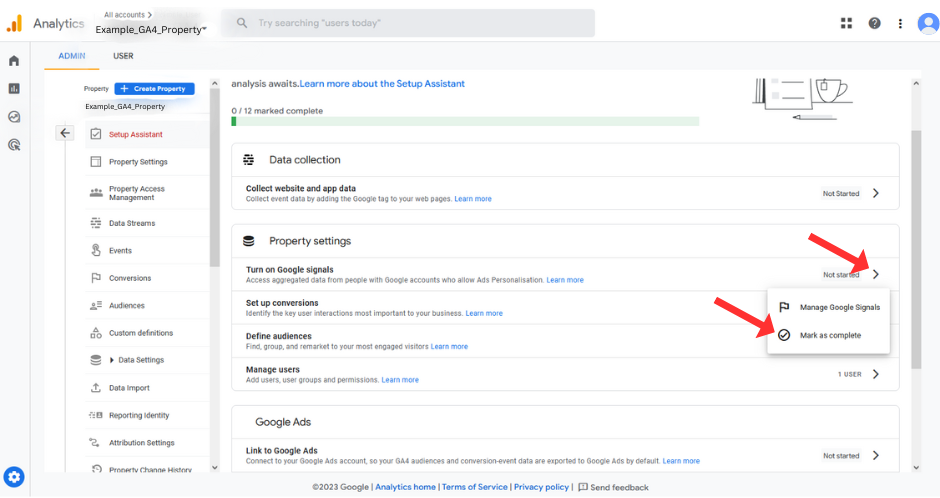
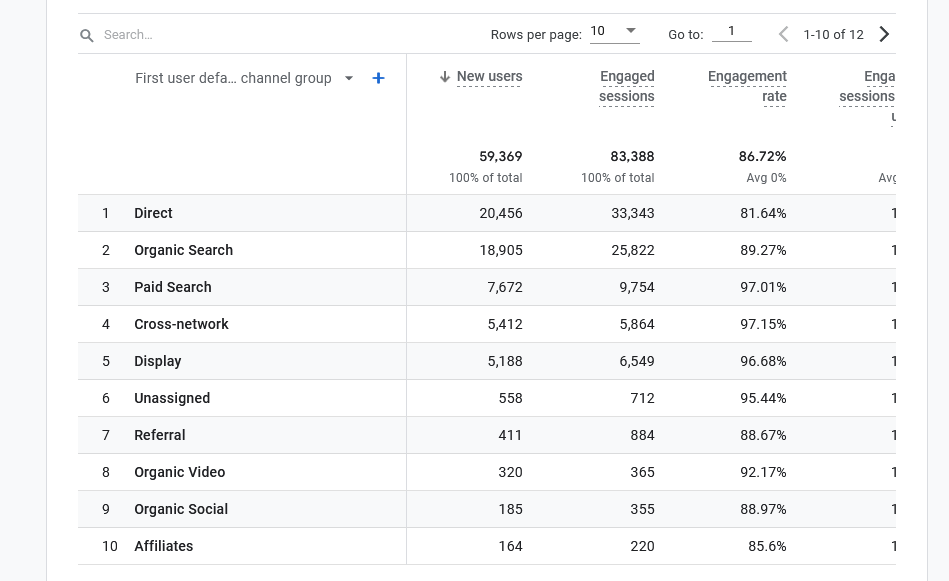
In order to collect data on how users interact with our webpages, we need tools that have access to our site and that can collect data on our users. Some hosting platforms come with varying degrees of analytics tools, but to get a full picture of our site, we can use Google Analytics.
Social Media
Social
media is a great way to reach your audience beyond your site as well as
interact with people who have yet to encounter your products and services. There
are a variety of social media platforms we could use, but almost all of them
aim to engage directly with our audience.
The metrics we track on our social media channels vary
per platform, but are all based on user interaction. Likes, shares, and comments
are the most common types of interactions we can encounter. Likes can help
guide us on what kind of content our users want to see on our social media
accounts while shares can really point us to the content that is truly
resonating with our followers. Comments, on the other hand, can suggest both
good and bad results. Some comments can be positive and provide great direction
on why users like a specific post. Comments can also be critiques of content that
we can use to make our posts better in the future.
How to Track: Social Media Management Tools
Most social media platforms keep us up-to-date with new followers and post interactions. However, having multiple social media channels can make it hard to keep track of all of them efficiently. Social media management tools, such as Hootsuite or MeetEdgar, allow us to create, post, and track how our content is doing on all our social media platforms through one tool.
Email
Despite the popularity of social media, email
marketing is still an effective way to interact with your audience. With
emails, we can keep our users informed about our business, share special deals,
and encourage users to check out our products and services.
To track the effectiveness of an email campaign, we can
note subscribes, open rates, and forwards. Keeping track of how many users
subscribe or unsubscribe can inform us on how effective our subscribe pitch is
as well as how interesting our email content is. Open rates, much like page
views on a blog, can help us determine if the topics we are discussing are of
interest to our users. Tracking forwards is much like tracking shares on social
media; it can help us identify content that resonates with our readers.
How to Track: Email Marketing Tools
In order to track how our emails are doing, we can use email management tools. AWeber, for example, can be used to create, send, and track how our subscribers are interacting with our email content. Management tools such as AWeber also allow us to breakdown our audiences into specific groups, enabling us to further optimize our content per customer type.
Site Performance
Beyond tracking content engagement, tracking how our site is
performing is important in ensuring quality user experience. Following Google’s
Core Web Vitals, our site’s performance can be measured by tracking the speed
of our site.
To measure the performance of our site, we need to be
looking at how fast our page loads, stabilizes, and responds. When a user first
arrives to our site, the time it takes for our page to visually appear would
determine how fast our site loads. However, even after our page loads, our page
may not load entirely at once. The speed of which our site stabilizes, or
rather, adjusts the content to its right location, is important to note when
measuring performance. Lastly, with our site ready for use, noting how long our
site takes to respond to user input, such as a click of a button, can help us
understand the quality of our user experience.
How to Track: Performance Tools
There are a few free tools that we can use to measure the speed of our site. Page Speed Insights, GTmetrics, and Webpagetest are three tools that we can easily use to get an idea of how our site is performing.
Search Engine Optimization (SEO)
Even if our site and content are performing well, ensuring that our site is easily findable is key to bringing more traffic to our site. This means that we need to be able to create and measure Search Engine Optimization (SEO) strategies.
To measure how searchable we are, we should track keyword ranking, average position, and overall organic traffic. When optimizing our site for searchability, we want to identify the keywords that we utilize when it comes to user’s searching for our content. Noting those words and how often our site is associated with them is important in identifying if the keywords we are using are successfully bringing traffic to our site. With the handful of keywords we do rank for, we want to note where we show up in search results. Are we in the top 5 results in a Google Search? Or are we a couple pages behind? Our position can say a lot about the whether or not we should keep focusing on certain keywords or phrases. Finally, we should keep track of how much traffic search results are bringing us as an overall baseline for how our SEO strategy is doing.
How to Track: Search Tools
There are a few tools we can use to check our SEO rank and relevant keywords. However, to see the a fuller picture of how our SEO strategies are performing, we can use Google Search Console, an SEO tool that shows us how Google ranks and presents our sites.
Want to Learn More?
By measuring our efforts, we can make clearer strides
towards optimizing our website for more traffic and more conversions. Explore our other blogs to
learn more about what you can do to improve your site! If you are interested in
a more hands-on course about how to optimize your website, join the waitlist for Carrie Saunders’ upcoming course, “The
Converting Website.” In this course, she will dive into
important factors that aim to increase the conversion rates of your site!
Part of establishing an online presence when it comes to our businesses is having a distinguished brand. With a quality brand, customers should be able to quickly recognize our business no matter what platform we are using, as well as understand who we are. However, a company brand is more than just our logos and slogans. Brand bleeds into the words we use, the visuals we utilize, and the stories we share. In this article, I want to go over some key aspects to keep in mind when shaping our brands.
What makes a Good Brand?
Our brands are what many potential customers will notice
first, as well as what they will remember when leave our sites. Having a good
brand means that your business is recognizable both in its visuals and its story.
Company purpose, values, and origins can be communicated through your brand,
and a successful brand will be memorable and attractive to your target audience.
Just like many other aspects of our sites, our brand is another part of our
business that should speak to our users.
How do I create my brand?
Know your Audience
The key to creating content that resonates with your users is to know your users well. When creating our brands, we need to understand what our customers are looking for. This includes researching their pain points, demographics, as well your competitors. By understanding what is available to your target what they really want, you can design your brand around a gap in your industry. We can find this gap by identifying issues our ideal customer is having with other companies as well as potential audiences who seem absent from the market.
Share your Story
After we have a firm grasp on our audience, we should decide
how we want to share our story. How did your company start? Why are you
invested in it? What makes your company special? Sharing our story can help us illustrate
values that our customers can connect with. In terms of our brand, this is important
since the stories we tell create a persona around our company. Creating a
persona that is comfortable, relatable, and reliable can establish trust
between us and our customers.
Choose your Words
Since the stories we share shape the face of our company, the words we use also come into play in creating a trustworthy and memorable brand.In our blogs concerning SEO, we emphasize the importance of communicating with words that your users use and understand. Consider how your customers talk about their troubles and the solutions they are looking for. By speaking the language of our customers, our brand will better resonate with our target audience since we will be speaking directly to their concerns and needs.
Create your Visuals
With the “voice” of your brand established, the next big
step is creating a visual representation for your company. This includes
your logo, color choices, fonts, and commonly used images. Your logo and colors
will depend on what is recognizable in your specific industry and to your
target audience, as well as what your company’s story and goals are. Fonts
should be readable and create the tone your company wants. Having of a
collection of images to use on your site and promotional content can help add
variety to your content. The key aspect to having successful visuals is
consistency. Make sure to use the same fonts, logos, colors, and types of
images throughout your content to create a sense of professionalism and make
your company easily recognizable.
What’s the secret to a Memorable Brand?
When creating a quality brand, we need to make sure that
we are consistent and that our brand is in everything we create. Whether it
be on our site, on social media, or in marketing content, the voice and
appearance of our business should be present and similar to the rest of our material.
We can do this by documenting our
brand. Have your colors, fonts, keywords, and images saved and annotated in
terms of when, where, and how to use them. Having a variety of sizes, file
types, and styles for your brand material can also aid in maintaining
consistency throughout your channels. Overall, creating essentially a kit
for your company can aid in making sure your team is all on the same page when
creating content.
Want to Learn More?
Our brand is just one part of our business identity that we need to consider when creating quality content and attracting more customers to our site. Explore our other blogs to learn more about what you can do to improve your site! If you are interested in a more hands-on course about how to optimize your website, join the waitlist for Carrie Saunders’ upcoming course, “The Converting Website.” In this course, she will dive into important factors that aim to increase the conversion rates of your site!
With the popularity of smartphones, many first-time users of
our site will be visiting from their phone screen rather than on a desktop
computer. In order to ensure that our site makes a good first impression no
matter what device users are coming from, we need to create sites that are
mobile friendly. This means our site should adjust appropriately to the device
it is being viewed on.
Why are Mobile Friendly Sites important?
Beyond the fact that many eCommerce customers shop via their
phones, there are other benefits to making our online shops and websites mobile
friendly.
To start,having a quality mobile site can increase
your ranking in search engines. Some search engines, such as Google, not
only incorporate mobile friendliness into their ranking criteria, but they also
have taken to ranking mobile sites first. This means that, even with a quality
desktop site, your mobile site may be reviewed for search results instead,
impacting your SEO score.
Other than SEO, having a good mobile site directly
impacts user experience. With the potential of visitors viewing your site
on their phones, we want to make sure that our site shows the best our company can
offer. This includes things like fast loading times and complete access to the
same features your desktop site offers. By having a quality site no matter the
device, we can create an experience that positively impacts our reputation and encourages
reoccurring customers.
What Makes a Site Mobile Friendly?
Mobile Responsiveness
When visiting your site on mobile, it may be hard for users
to interact with your pages if they are the same size and format of your
desktop site. If your site is too difficult to use, a potential customer may
leave before giving your products a chance. To avoid this, a responsive
design on your website is a must have. A responsive site is a site that is
able to reformat itself to the screen size it’s on. This means that, if your
site is visited on mobile, the page’s text, buttons, menus, and so forth will
be resized for better use on a smaller screen.
Adjusted Navigation
A responsive mobile site will not only adjust the pages themselves, but also the navigation menus and search features as well. On mobile, a full navigation menu could either take up too much space, or be too small to interact with. Instead, the menu should be resized and reformatted. Many sites utilize the “Hamburger Menu” for mobile view. A hamburger menu appears as a button that users can click to open up the menu as well as close it. This allows users to explore your site without the menu being in the way while also keeping the menu properly sized and usable.
Note: Make Your Search Option Obvious
A part of making your site mobile friendly is making it easy to find the content a user is looking for. However, even with adjustments to size and navigation menus, it still may difficult to locate specific pages on such a small screen. Having a search option easily accessible and clearly visible can give mobile users another option to use when exploring your site.
Readable Text and Buttons
On a small screen, reading content and clicking buttons can be a difficult task for users. Some users may click a button only to accidentally hit another, or even miss it entirely. Zooming in to read small text can quickly become a chore while exploring your site. To avoid discouraging your user from using your site, your site should have bigger text and optimized buttons for mobile use. Text should be readable without zooming in and buttons should be adjusted for touch rather than clicking. Making your site easy to use and readable will help keep users on your site longer.
Optimized Visuals
While our banners and videos may look great on a desktop computer, squeezing those visuals onto a smaller screen can result in diminished quality and usability. Especially with our Above the Fold content, we want to make sure that the presentation of our visuals translates over to mobile view. This means that our site should resize these visuals and re-arrange them according to the device they are on.
Note: Hiding Features can Negatively Impact your Site
When adjusting our site to mobile view, we may be tempted to hide certain features and images that are available on the desktop version of our online shop. However, hiding content from viewers can impact your SEO score. While your users can’t see the missing content, search engines like Google can tell that you have hidden content from the page. Google does not approve of hidden content and will note it when ranking your site. Avoid hiding content and instead reformat the content the best you can for mobile use.
Want to Learn More?
Improving our site for user
experience is key to bringing more traffic to our sites, and thus attracting
more potential customers to consider our content and products. Explore our other blogs to
learn more about what you can do to improve your site! If you are interested in
a more hands-on course about how to optimize your website, join the waitlist for Carrie Saunders’ upcoming course, “The
Converting Website.” In this course, she will dive into
important factors that aim to increase the conversion rates of your site!
Finding the right words to focus on when optimizing your
site for searchability is an essential step to increasing your visibility. However, with the variety of words available
to us, it can be hard to get started. Luckily, there are a few steps we can
take to begin finding keywords that will define our business and help us begin
our SEO strategies.
Defining Keywords
Keywords are the words that your audience use when searching
for specific products or services. Depending on what you are offering, who your
audience is, and what industry you are in, which words attract people to your
business can vary. Finding the words you want to focus on is essential to SEO
since these words will be used in your content, titles, URLs and so forth.
Finding Words that Benefit your Company
One thing to note is that we must research which words we
should be using thoroughly. While we could try to use any word that seems
related to our services, it could detract from more important words as well as
bring unwanted traffic to our site. Even using words that are popular in your
industry can be pointless since those words are already heavily associated with
other companies.
In the end, the keywords you decide to focus on should be a
mix well-known words in your industry alongside niche vocabulary that relates
to your target audience and specific expertise.
Steps to Get Started
Understand your Business
Before beginning keyword research, it is important to have
solidified idea of who your company is. Knowing your products and services is
the first step, followed by defining the “why” behind them. Why did you choose
to sell these products and services? What is your mission or goal?
Realistically, our offerings will have substitutes to compete with, so
establishing what our “niche” is, what makes us different from other companies,
is a key part of figuring out which words we will want to use to describe
ourselves.
Note: Look for the Gaps
We can find our niche by looking for what gap we are filling in our industry. What is your company providing that other companies are not? This gap can be found within our products, target audience, work methods, history, mission, and so forth.
Know your Audience
Knowing our audience is essential to finding good keywords.
We need to understand what words and phrases they are searching for in search
engines so that we can use them in our content. By matching our content with
our audience’s words, we will be more likely to show up in their search
results. To do this, we need to first identify who our target audience is. What
do they want? What pain points are they trying to solve? By looking at your
products through the customer perspective, we can better define what keywords
we should use.
Research your Competitors
The last thing we should keep in mind when beginning keyword
research is our competitors. Our selection of words will be heavily based on
the industries we are in, but we also want to make sure we stand a fighting
chance to rank in the keywords we choose. Conducting searches of words you are
interested in and seeing which competitors come up can help us figure out if
the word is worth investing in. Consider the size and influence of the businesses
that come up as well as the type of company they are. Sometimes, we will find
that the word is heavily associated with a specific business, or that the companies
that show up in certain results are not relevant to your own offerings.
At the same time, continue looking for gaps as you research
your competitors. Are there words that your industry is not using that could be
relevant? By looking for gaps, we can find opportunities to make strong
associations with keywords that other companies have not used.
Want to Learn more about SEO?
Search Engine Optimization is a continuous process, moving
beyond just keywords. Explore
our SEO blogs to learn more tips and tricks to improve your ranking! If
you want more hands-on guidance for improving your website,join the
waitlist for Carrie Saunders’ upcoming course, “The Converting
Website.” In this course, she will dive into a variety of important factors
that aim to optimize your website.
In previous blogs, we have explored Search Engine Optimization (SEO) in many contexts. From its benefits to the ways we can create SEO friendly websites and content, bringing people to our site via search engines is a broad topic. Another important aspect to consider when optimizing our sites for searchability is maintaining the hard work we have accomplished.
As our businesses grow and our needs and goals change, we may have to change the platform that we are hosting our online shop on. Such a major change can impact our current SEO ranking drastically. However, there are some key factors we can keep in mind while migrating our websites that can help us maintain our current SEO score.
Why is SEO Important to Think About when Re-Platforming a Site?
Major changes to our site can impact our online shop’s functionality and quality, but also our sites visibility. When we re-design a page or add new content or features to our site, search engines such as Google notice these changes and review them. Sometimes, big changes can lead to re-indexing by Google, meaning that Google will re-evaluate your page’s SEO rank.
Many times, our changes are aimed to positively impact our SEO rank, but changes can do the opposite as well. When migrating a site, not only could your SEO score change, but your site could lose its previous SEO score all together. Your SEO history is attached to your domain, and so changing your domain can result in total re-evaluation. Keeping this in mind when migrating your website, which will inevitably involve changes, is very important for us to keep our current traffic.
What should I keep in mind for an SEO friendly migration?
Before Migration, Document Your Current Site
Before migrating your site, benchmarking your website both in terms of functionality and in terms of SEO is an important step to take. Knowing where your site stands now is key to identifying any changes that may occur once you have migrated your site.
Documenting all of your existing content is also important in maintaining your current SEO score. Every URL should be noted, even if they are not your top pages. While doing so, also note any broken pages as they can be fixed during migration.
When Migrating your Site, Save Changes for Later
While we may have ideas to improve out sites during migration, it is best to save those plans for later. In order to ensure that we maintain our current SEO score and can troubleshoot SEO problem later, we must keep changes minimal. During migration, your new site should reflect your old site as much as possible. This includes content and structure. Wait to remove pages you plan to discontinue or new features you want to incorporate in your future site. Document your changes for future use.
Consistency is key to maintain your SEO score, so we must pay close attention to every part of our site. This includes transferring over things like page titles, meta descriptions, robot.txt files, sitemaps, and more. Anything that can be seen by Google’s crawlers is important to keep consistent in your new site.
Note: Migrate in Sections
One method we can use during migration is to migrate our site piece by piece rather than all at once. We can start with less important sections of our site and see what changes occur. Migrating in sections helps us see what we may need to adjust in our migration strategy as well as gives us some practice for when we migrate more critical parts of our online shops.
Redirect Every Page
When migrating your pages to your new platform, make sure that you redirect your old pages to your new pages. This will not only ensure that users trying to use your old URLs will be able to reach your new site, but also will help inform search engines that your pages have moved. This includes changing any existing redirects to lead users to the correct content.
When redirecting pages, it is best to use a one-to-one method. This means that each page is recreated on your new platform and is redirected to it. While it may be tempting to do many-to-one redirects, such as guiding users on older product pages to a page with a collection of products, it can negatively impact your SEO score.
Monitor Duplicate Content & Errors
During migration, you will run into the issue of duplicate content since you are duplicating your website. Duplicate content can negatively impact our SEO scores. However, there are a few things we can do to avoid our score dropping due to page creation:
Use ‘noindex’ tags – During migration, we will inevitably run into the issue of having duplicates of every page of our site. To avoid impacts to SEO, make sure to use ‘noindex’ tags on your new pages. This tag will tell Google’s bots to not index this page, which will keep search engines from noticing the duplicates for the moment. Note that these tags must be removed once we want to go live on our new platform.
Keep in mind HTTP to HTTPS changes – During migration, you may want to enhance your sites safety and reputation by securing your site with HTTPS as suggested by Google’s Search Essentials. However, keep in mind that HTTP and HTTPS pages are considered two different pages and may result in duplicate content. Make sure to redirect HTTP pages to your HTTPS pages to avoid impacts to SEO.
Use canonical URLs – Canonical URLs are a way that we can tell search engines what page we would want them to send users to if there is duplicate content. By using canonical URLs, we can tell Google that we prefer that users be led to our original content while we are working on our new pages.
Keep Mobile in Mind as you Migrate
While we want to keep changes minimal while we migrate our site to a new platform, we should be paying close attention to how our new site runs on mobile. Search engines like Google have taken to indexing mobile sites first, which can impact our SEO score if we are not careful. This means that we need to make sure that our mobile site is optimized. It should feel fast and adjust to smaller screens to be readable and easy to use.
Note: Avoid hidden content
Some developers hide content in mobile view that would be visible on desktop in order to increase readability and speed. However, hidden content is noticeable by crawlers and can negatively impact our SEO scores. When optimizing your site for mobile, avoid hiding content and instead adjust the content to suit mobile use.
Document any Tools or Services that you have currently Incorporated
into your Site
Besides migrating pages, we will want to document all the tools we may use on our site as well. These could be analytics tools, crawlers, or plug-ins that we are currently using. Create list of these features and take a look at their documentation if they have guides for migrating the tool itself and the data it has collected. For tools that are not compatible with your new platforms, consider looking for a substitute to incorporate during post-migration.
Create a Post Migration plan for SEO
After migration, you will want to have a plan to analyze and troubleshoot your new site. This includes keeping an eye on your logs and analytics for changes in traffic and rank. With minimal changes to your site, finding the source of these changes should be easier.
Aside from troubleshooting, starting a new platform means we have new opportunities to explore. While during migration we suggest keeping changes to a minimum, after migration we can continue optimizing our site for user experience, quality of service, and SEO. Optimizing searchability is a continuous process, so create an SEO plan for your future online shop to push your site further!
Want to Learn more about SEO?
For your post-migration plan, there are many ways that we
can optimize our websites for both SEO and improved user experience. Explore our SEO blogs to learn
more tips and tricks to improve your ranking! If
you want more hands-on guidance for improving your website,join the waitlist
for Carrie Saunders’ upcoming course, “The Converting Website.”
In this course, she will dive into a variety of important factors that aim to
optimize your website.
In eCommerce, providing a sense of security to your customers is essential in creating trust and long-term relationships. Part of that mission requires us to stay up to date with possible security concerns that may impact our customers and the safety of their data. A current vulnerability that we should be aware of is OpenSSL’s recent CVE-2022-3602 & CVE- 2022-3786 vulnerabilities.
What is OpenSSL
OpenSSL is an open sources software that we can use to secure our websites. Websites that are secured tend to have “https” in their URL and a small padlock next to their web address, but what those two visual queues mean is that your site has a valid certificate.
Example of a secure site with a valid certificate.
A certificate is a way of establishing that 1) you are who you say you are, and 2) the communications that happen on your site are encrypted. While the contents and creation process of certificates involve multiple steps, they are essentially a bundle of information about your site that is signed by a trusted authority, allowing your customers to also trust your business. OpenSSL is a way to create and implement these certificates on your site.
Why should I care about Certificates?
While sites can run without certificates, web browsers and search engines are very particular about security. Not having a certificate or having an invalid certificate can lead to your site being marked as a risk. Sites deemed questionable will require customers to manually click a button to accept this risk to visit your site. This may result in potential customers leaving your site before even seeing your content.
Example of a warning concerning a site with a invalid or bad certificate.
Another downfall to not having certificates is that search engines like Google will rank your site low on their search engines, if not leave your site off of relevant searches entirely. As discussed previously in our blog on Google’s search essentials, having proper security is a bare minimum for Google to consider indexing your site. Organic traffic relies on the searchability on your business, so ensuring that your site has a proper certificate is essential to your online shop’s success.
Beyond that, having safe lines of communication with your customers, especially considering the exchange of financial information in online shops, is imperative to protect your customers and your business. Not having proper security leaves your site open to hackers and attacks, and that can affect the functionality of your site, the privacy of information, and the overall reputation of your business.
What is CVE-2022-3602 & CVE- 2022-3786?
CVE-2022-3602 & CVE- 2022-3786 are vulnerabilities that appeared on October 25th, 2022, that were originally marked at a critical threat vulnerability to those using OpenSSL. OpenSSL’s ranking of risk follows a four-level scale, with critical being the highest. This means that these vulnerabilities affect both common usages of OpenSSL and have a high risk of being exploitable, meaning that someone with malicious intent could use these vulnerabilities to their advantage.
In this case, these vulnerabilities involve a common software weakness called buffer overflow. Buffer overflow is essentially how the internet handles large pieces of information. Just like how we can only carry so many groceries from our cars into our houses after going shopping, the internet can only take so much information at a time. When we try to carry too many bags at once, we may drop something or struggle to successfully carry everything into the house. This vulnerability targets that weakness.
CVE-2022-3602 & CVE- 2022-3786 target the process of proving the validity of a certificate, that a site is who it claims it to be and that it is safe to visit. These vulnerabilities can be acted on after an application or user has manually approved an invalid certificate or has encountered a falsely signed certificate. In turn, a malicious actor could send a bunch of information on this open channel when looking at the certificate and cause one of two things:
Crash the service to where the user can’t access your site.
Possibly tell the browser or site to do something, like execute code.
Now, on November 1st, 2022, OpenSSL lowered the risk level of these threats to high, meaning that these vulnerabilities were less exploitable than originally anticipated, but still something to be aware of. This is because both of these vulnerabilities require many factors to be in place to work effectively. Your server must have adopted the specific version of OpenSSL, version 3.06, and our users would have had to accept a bad certificate OR a malicious actor would have had to convince a certificate authority to sign a bad certificate. All these factors are unlikely. With OpenSSL version 3.06 being new, adoption is low. Most users and applications are aware of the risks of accepting bad certificates, and it is not easy to forge a fake certificate that is properly signed.
Who does this effect?
These CVE vulnerabilities can affect those who:
Interact with OpenSSL.
Trust third party or untrusted certificates manually or automatically.
What should I do?
If you think you fall into one of those categories as a business owner, the good news is that OpenSSL released a patch that removes the threat of these vulnerabilities. All you have to do is make sure that, if you are using OpenSSL, you update to the newest version, version 3.07. In terms of maintaining future security, make sure your site has a valid certificate and that your site isn’t accepting invalid certificates.
In our previous blog, we explored some of the ways we can
use content
marketing to keep our customers engaged with our offerings and brand. With
a variety of content types to choose from, it can be hard to get started. A
good starting place for content creation is blog posts.
Blog posts are a collection of regularly posted articles
that share information to your audience. Varying in length and content,
blogs tend to be an informal way to keep in touch with your users. Blogs can
be used to educate, promote, and push brand awareness for your company. Before
we dive into how to write a blog, let’s explore some of the types of blogs we can
write.
Types of Blogs
There are many types of blogs on the internet today. In
order to determine what kind of content you want to create, you will need to
have a good understanding of the way your audience communicates and digests
content. A few types of blogs we can consider starting with are:
Tutorial Blogs: These blogs help teach and guide readers on a topic. They can be comprehensive, step-by-step blogs or even a collection of general tips. If your customer base is interested in learning, sharing your insights through blog posts can catch their interest.
News Blogs: These blogs aim to share recent information that may affect your audience. These updates could be directly about your company or about other important occurrences that will affect your business and customers. Keeping your audience up to date on factors that will impact them can be valuable to your readers.
List Based Blogs: These blogs can vary in terms of topics or goals, but generally share a list of similar topics. A list of the pros and cons of hosting products, for example, would fall into this category. Informing your users of multiple solutions or things to consider through a list blog can help them make educated decisions and even better understand your offerings.
What blog type you choose to write will depend on your
expertise and customer base. What information or insights do you have or
want to share? What are your customers interested in? Answer these questions to
better determine what kind of blog may best suit your business.
How to Start blog Post
Getting started is the hardest part of most projects and writing a blog post is no different. There are three steps we must take when determining what we are going to write:
Choose a topic
When choosing your topic, consider your ideal customer’s
interests and concerns. What problems do they struggle with? Why do they
purchase your products? How can you help them? By connecting your expertise
to something they care about, you can define a topic that will be both
interesting and valuable to your customer.
Research your topic
One thing to remember when writing blogs is that you are
not expected to be an expert immediately on the topic you are writing about.
Consider your knowledge when thinking about what you want to write, but also
research your topic by reading similar blogs, listening to podcasts, analyzing
courses, and so forth.
Note:Gaps in Knowledge can Offer Opportunities to create something Unique
An important detail to note when researching a topic is what is missing or incomplete. If there are gaps in information being shared about your topic, you may be able to fill that gap in your own writing. By providing new knowledge to the context of your topic, your blog can stand out amongst others.
Write an outline
After your have collected notes on your topic, write an
outline about what you want to share and how you want to share it. Creating
structure helps you both share information in an organized way, but also see visually
if your ideas are connecting like you thought they would. When writing your outline,
consider the structure of your blog along alongside the topic you are
discussing and the solutions you are providing.
Writing your Blog
Most blogs are structured with an introduction, body, and
conclusion. Following this structure can help get your started on writing a
piece that is complete and easily digestible. However, there are multiple details
to consider while writing your blog.
Titles & Headings
When writing a blog, you will eventually need to decide on a title for it. Titles can be determined at any time as you write your blog. Some blog titles are clear and concise, such as “How to decorate a Christmas Tree,” while others are intentionally vague, such as “10 things you shouldn’t do when decorating a Christmas Tree.” Both of these hypothetical blogs could contain the same details and insights, but they work to attract different audiences. Consider what titles would attract your specific reader base.
Beyond titles, your article may contain multiple subheadings that divide your article. Headings make your blog more palatable and easier to understand. When considering your headings, or even your title, keep in mind the keywords your audience associates with the topic you are writing about. How do they communicate about this topic? What words are they using to search information about these topics? Determining important keywords around your topic can help you not only communicate effectively with your audience, but also improve your Search Engine Optimization (SEO).
Writing Introductions
Introductions are said to be the hardest part of writing a blog. However, the main goals of an intro are to catch your reader’s interest and provide them a brief explanation of what your blog is going to be about. Your introduction could present a problem that your readers are struggling with and then explain how the following blog will provide solutions or insight into that problem. The “hook” of your intro will depend on your audience, but overall, readers should understand who this blog is for and what value it will share when reading your introduction.
Creating the Body of your Blog
The body of your blog will be where the meat of your insights reside. In the body, your audience should learn about the details or solutions your introduction said your blog would discuss. Making sure this information is easy to read and understand is key. A few factors to keep in mind to help readability are:
Keep your sentence and paragraph length in mind:When writing the body of your text, you will want to make sure your sentences are easy to digest. Keeping your sentences short can help readers take in your topic in small bites. The size of your paragraphs at first glance can also encourage or discourage your audience from reading your blog. Use paragraphs to break up your text and keep them as small as you can, maxing them out at about three to five sentences.
Highlight important aspects of your blog: While we want our audience to read our blogs, there are many readers who will want to quickly find the insights we are offering. Making our blogs skimmable can make them more valuable to such readers. One way we can emphasize important moments in our blogs is by bolding or highlighting them.
Link to existing content:While reading our blogs, some readers may find themselves confused or interested in specific factors surrounding our topics. If we have other blogs or resources that can offering our audience more reading or insights, we can link those into our current blog. By linking to other content, we also add more value to the page in terms of SEO.
Use images when needed: Images can be used in our blogs to break up text as well as provide further detail into complicated topics. For example, tutorials can be enhanced with the use of images to help guide the reader not only through words, but with visuals.
Concluding your Thoughts
At the end of your blog, not only can you finish up your thoughts, but you can also offer actions for your readers to take. If they liked this blog, what can they do next? In your conclusion, you can use Call to Actions (CTAs) to guide your reader towards a next step. These CTAs could be as simple as reading more blogs or could be a promotion for your products and services. Conclusions can also be a place to ask your users for feedback on the topic, opening a channel for communication.
Note: Consistency is Key
When writing blogs, the main thing to remember is to keep writing them! Having a regular schedule of blogs can keep your audience engaged and deepen the connection they have with your company.
Want to learn more about content creation?
Writing blogs is just one type of content we can use to
connect with our customers and bring more traffic to our websites. Explore our other blogs to learn
more about what you can do to improve your site! If you are interested in a more
hands-on course about how to optimize your website, join the waitlist
for Carrie Saunders’ upcoming course, “The Converting Website.”
In this course, she will dive into important factors that aim to increase the
conversion rates of your site!
While eCommerce sites are mainly virtual stores where we can
sell our products and services, having other pages on your website can aid in
making us memorable and attractive. One way we can do this is by offering a
variety of content themed around your customers interests and what your
business has to offer.
What is Content Marketing?
Content marketing is the process of creating content for
your ideal audience that will aid in driving them to become customers. This
method of marketing does a few things for us. It allows us to share valuable,
interesting content that can attract customers, solidify our brand, and improve
the user experience which can impact our SEO Rank. We are also encouraging
customer loyalty through proving through our content that we are reliable and
are experts in our field.
What Content Should I Create?
There are a variety of ways we can approach content
creation, and at the end of the day, it really depends on who your customers
are. Knowing your customers is key to effective content marketing. For
example, a few questions to consider about your customers are:
What are their interests?
Where do they hang out on the internet?
How do they like to communicate?
What is their general education level about your
field?
What are problems are they currently struggling
with?
Having answers to these questions can help you 1) figure out
who your audience really is, and 2) what content are they needing right now.
Some of the best content you can create will involve solving a problem or answering
a question your customers may have, as well as content that helps them
understand their desires and goals.
What Types of Content Should I Consider?
Once you understand your target customer, you can choose
from a variety of content types that will depend on your customer’s communication
preferences. Below are a few content types that you may want to consider.
Blogs
Blogs are one of the most straightforward types of content
we can utilize on our sites. Writing about current content that is valuable
to your users helps increase your credibility and also illustrate your brand as
customer centric. Blog contents can range from news updates to advice, but
overall should aid in informing the user on a topic they are interested in or
that can help them in some way.
While blogs can be intimidating in terms of word length,they are quick to implement as well as the cheapest approach when compared to
other types of content. However, the effectiveness of this method all
depends on the quality of your blogs. Knowing what you customers want and
providing them with information that can benefit them is key.
Infographics
At times, certain topics will be too complicated to explain
with words alone. That’s where infographics come into play. These graphics
are visual representations of information and can aid in illustrating more
complex topics with a mix of words and pictures. This type of content should
be easy to understand and visually compelling. An example use case of an infographic
could be to put a statistic into perspective by using visuals to show the value
of that stat. You can also use it to illustrate the flow or steps of a process,
the visuals helping users comprehend complex processes quicker and easier.
This form of content can be eye catching and engaging,
but remember that just like with our other types of content, they need to provide
value to our customers. They should help customers understand a subject and
ideally remember that subject with the help of recognizable visuals.
Videos
Videos are great ways to share information quickly and in an
engaging way. Company stories, product reviews, tutorials and more can be
shared in the form of video, giving users the chance to get to know you, your
values, and your products better. Since we can’t show customers our
products physically and some products are not tangible to begin with, videos
can help put them into perspective. They are also a great way to establish the voice
you want your company to have.
While videos are a bit more involved than other content,
they can be useful in moderation on your site and can generate great results.
Afterall, videos are very popular way to consume information as seen with
successful social media platforms such as YouTube or TikTok. If you are worried
about length, videos don’t have to be that long, just long enough to convey
some value.
Reviews
Sometimes, you will have potential customers that are
interested in your products, but still uncertain about buying. The use of
customer reviews and testimonials on your site can help relieve the ambiguity
about your product’s credibility as well as help people under what your
products and services do. While you can write up content explaining why
your business is useful, hearing real stories from customers that have been helped
by your business can do wonders.
Getting reviews and testimonials could take time, but
once you have them, they are free, valuable content that you can share in multiple
places around your site. Keep in mind which review you decide to share as
they will impact how people see your brand and your products. Aligning your
selected testimonials with your goals and desired brand can help create clarity
on what you are offering to your customers.
Want to Learn More?
Bringing traffic to your site is a constant process and it
can be hard to know where to start or what you can do. BCS Engineering is always here
help if you need changes made. If you want a deeper dive into what you can
do on your own to optimize your website, join the waitlist
for Carrie Saunders’ upcoming course, “The Converting Website.”
In this course, she will dive into important factors that aim to increase the conversion
rates of your site!
There are many ways we can work to bring traffic to our online shops and websites. Optimizing user experience, refining our searchability, and using effective email marketing are just a few of the ways we can broaden our visibility. However, to create an effective marketing plan, we must keep in mind the many channels a potential customer can discover us through. One such channel is social media.
Many of us may already use social media for marketing or on a personal basis. These online communities are great places to establish your company’s presence. While brick and mortar stores can rely on foot traffic to gain awareness and engagement, eCommerce businesses don’t have that luxury. Unlike customers who walk in a mall and are exposed to a select number of companies, online customers have a worldwide range of shops to choose from, and many online shops can drown in the sea of competitors. Due to this, it is important to use every channel we can to reach our target audiences, including social media.
Why should I use Social Media?
Beyond creating a company presence, there are many reasons
why we should include social media channels into our marketing strategies.
Increase traffic and conversions
Having multiple channels where users can discover your products and services can lead to more traffic on your site, and more traffic means more potential customers. Utilizing social media can help increase our conversion rate by increasing our business’ visibility and engagement.
Establishes your brand
With any medium we use, whether it be emails, videos, blogs, and so forth, maintaining a consistent brand can do a lot to attract new customers and retain reoccurring ones. With more visibility with the help of social media, we can increase the awareness of our business’ through exposing our brand to people on a more constant basis.
Creates opportunity for customer engagement
One benefit to social media is that it can keep your users engaged with your business even when they aren’t buying your products and services. Users can interact with your posts and content with comments, reactions and shares, keeping your company in their memory for when they may decide to buy.
Provides an avenue for social proof
While you can create content to establish the quality and validity of your products and services, user reviews and stories are the best way to create social proof. User comments, tagged posts, and reviews can be created through social media channels and shared to our pages to increase the value of our business.
Cultivates an open dialogue with your customers
Social media offers a two-way street between us and our customers. Opportunities for customer feedback as well as competitor visibility can aid in our decisions on what to improve and optimize to create better user experiences.
What Social Media Platforms should I use?
With many social media platforms to choose from, it can be hard to know where to start. The key to this decision is knowing where your target audience can be found. Depending on factors such as their age, demographic, occupation, location, interests, and favorite hang out sites we can narrow down which social media platforms we should put our time and effort into. Choosing a platform to establish your company on can also depend on the content you plan to produce. Let’s explore a few of the most popular platforms we could potentially use.
Facebook
Facebook is the largest social media platform out there. With a structure that is based on connecting with friends and following pages, its simplicity attracts a broad range of age groups. Facebook also offers a variety of content types to share such as text, links, images, and videos, making it versatile. Ideally, your customers would follow your business page and share your content with their network of friends and family, bringing more customers to your page that can share your content to their networks, and so forth.
Note: Successful Facebook Marketing can cost money
Due to how large Facebook’s user base is, it attracts many competitors. Due to this, being visible on Facebook can be difficult without the help of Facebook itself. Many Facebook marketing plans involve a mix of paid and organic posts to work effectively.
Twitter
Twitter is popular with young to middle aged adults. The platform focuses on sharing user generated content with other users based on their interests. Entertainment and news are the most popular genres of content. Twitter is a great medium for creating a brand personality and for sharing company updates and blog posts.
Instagram
Instagram and Facebook are run by the same company but have different approaches to social media. Instagram has a more focused approached to content, allowing users to post only images and videos with small amounts of text. While Facebook is used to connect with people and businesses, Instagram mainly attracts an audience that looks for content based on their interests. It also boasts the title of being the favorite platform for Gen Z users. Posting high quality photos and videos of your products, services, and general experiences can aid in increasing the visibility of your business as well as make it more relatable to users.
YouTube
YouTube is one of the most popular places for people to visit on the internet. Currently its most popular videos concern video games, music, and reviews, but a decent chunk of watchers also dive into tutorial and “how to” videos as well. YouTube can be utilized to share product demos, tutorials, customer testimonials, and more.
LinkedIn
LinkedIn is a platform that is less about your customers and more about your team and business connections. The majority of users of LinkedIn are college educated professionals either looking for a job or promoting their business. It is a great platform to see what other companies are doing, hire new workers, and discover business opportunities with other companies or large clients.
How do I Create an effective Social Media Presence?
While strategies can vary per social media platform and can
vary in cost, there are some basic best practices that can be followed no
matter what channel you decide to pursue.
Be Consistent
Posting the same amount of posts at the same time per week can help make your business more visible. Once you know your audience, you can learn what times they are most active on social media and follow that time frame when posting your content.
Post Often
In the end, quantity outweighs quality when it comes to most social media strategies.We want our businesses to be fresh in the minds of our customers, and to do that we need to be sharing a lot of content. Posting at least twice a week is a good starting point as you get a feel for these platforms.
Note: Automation tools can streamline the process
While posting often and at specific times may sound overwhelming, it doesn’t have to be! There are both free and paid tools available that will allow you to quickly create and schedule content to multiple social media platforms at once. Some examples of such tools are MeetEdgar and Hootsuite.
Have Variety
When creating content, you want to add some variety to it to grab the attention of your various ideal customers. Some examples of content we can share are news updates, inspirational quotes, promotions, giveaways, user reviews, Q&As, product advice, and many more.
Tailor your Content to your Audience
Since each social media platform is different and attracts different kinds of users, we will want to make content suited to each platform and audience. This will vary depending on who your ideal customer is and what platform(s) you decide to utilize in your marketing strategy. Create content that your specific audience will want to see by using words they will understand and addressing their interests and pain points with your products and services.
Want to Learn more about Optimizing your Website?
Social media is just one channel that we can utilize to bring
more traffic to our sites and to turn visitors into customers. Check out more of our blog to
learn more tips and tricks that can help you improve your website. If you
are looking for hands on learning,join the waitlist
for Carrie Saunders’ upcoming course, “The Converting Website.”
In this course, she will dive into important factors that aim to increase your
conversion rates through optimizing your website.